



Blog Summary
- Most cleanup scopes blow because the real file condition is invisible before the engagement starts.
- Xenett Pulse connects to QuickBooks Online and runs a 20-point diagnostic in under two minutes.
- The output is a Books Health Score (0 to 100) with every issue ranked by severity.
- The diagnostic covers banking, AR, AP, reconciliations, transaction coding, and GPT-powered anomaly detection.
- Use Pulse before proposals to set accurate scope and pricing, not after discovery.
- Pulse replaces a 2 to 4 hour manual file review with a consistent, documented two-minute check.
You take on a new client.
The books look fine on the surface.
Three weeks in, you find unreconciled accounts going back 14 months, duplicate transactions everywhere, and miscoded expenses across six categories.
The scope you quoted is already blown.
This is not a rare situation.
It happens to accounting firms every quarter, not because they made a mistake, but because there was no way to see the full picture before the engagement letter went out.
Xenett Pulse was built to fix that.
It connects to a QuickBooks file and surfaces every cleanup issue, reconciliation gap, and data quality problem in under two minutes.
Before the proposal.
Before the scope is locked.
Before the margin disappears.
Part of our complete guide: accounting client onboarding guide
Why QuickBooks Cleanup Engagements Keep Going Over Scope
The root problem is simple: you cannot see the real state of a client's books until you are already inside them.
Most accounting firms price cleanup engagements based on a quick file review: a few reports, a balance sheet glance, maybe a conversation with the client.
That is not enough.
QuickBooks files can look clean in the summary view while hiding months of unreconciled transactions, miscoded entries, and missing vendor details underneath.
By the time you find the real issues, the engagement letter is signed.
The fee is fixed.
And the scope has doubled.
According to QuickBooks data quality research, a significant portion of small business books contain classification errors that go undetected for months.
The problem is not that accounting firms are careless.
The problem is that the standard QuickBooks review process was not designed to surface hidden issues at the pre-proposal stage.
That is exactly the gap Xenett Pulse closes.
Stop Absorbing Catch-Up Overruns
Run a 20-point Xenett Pulse diagnostic in under 2 minutes and quote from evidence, not estimation.
Sign Up Free
What Is Xenett Pulse?
Xenett Pulse is a standalone QuickBooks diagnostic tool that generates a client-ready health report in under two minutes.
It connects directly to a client's QuickBooks Online file, runs a 20-point diagnostic across reconciliation, data quality, and accuracy, and produces a scored report, 0 to 100, with every issue ranked by severity.
It is not a reporting tool.
It is not a dashboard.
It is a pre-engagement diagnostic, built specifically for accounting firms that need to know the real state of a file before they quote, scope, or commit.
The output is a structured report you can present to a prospect, use internally to set pricing, or hand to your team as a cleanup checklist.
Here is what you get at a glance:
| Output | Description |
|---|---|
| Health Score | 0 to 100 across reconciliation, data quality, and accuracy |
| Severity Ranking | Issues sorted by impact: urgent, compounding, or safe to monitor |
| 20-Point Diagnostic | Covers banking, AR, AP, reconciliations, and coding |
| Cleanup Scope | Findings converted into actionable next steps |
| Client-Ready Report | Formatted for prospect presentations or internal review |
What Does Xenett Pulse Actually Check?
Xenett Pulse runs a 20-point diagnostic across five core categories: banking, accounts receivable, accounts payable, reconciliations, and transaction coding.
Each check is designed to surface the type of issue that stays hidden in a standard QuickBooks review, and only appears after the engagement has started.
Here is a full breakdown of what the diagnostic covers:
| Category | What Pulse Checks |
|---|---|
| Banking | Unreconciled accounts, cash discrepancies, and missing bank feeds |
| Accounts Receivable | Stale open invoices, duplicate customer entries, and unapplied payments |
| Accounts Payable | Unpaid bills past due, duplicate vendor records, and unapplied credits |
| Reconciliations | Last reconciliation date, uncleared transactions, and balance mismatches |
| Transaction Coding | Miscoded expenses, missing categories, split transaction errors |
| Data Quality | Duplicate transactions, missing details, inactive account usage |
| Accuracy | Journal entry irregularities, opening balance discrepancies |
| Anomaly Detection | GPT-powered pattern deviation flags for unusual transaction behavior |
The anomaly detection layer is worth calling out specifically.
Pulse uses GPT integration to identify transactions that deviate from expected patterns, not just rule-based checks, but behavioral pattern recognition.
That means it catches issues that no static checklist would surface.
How Does Xenett Pulse Work?
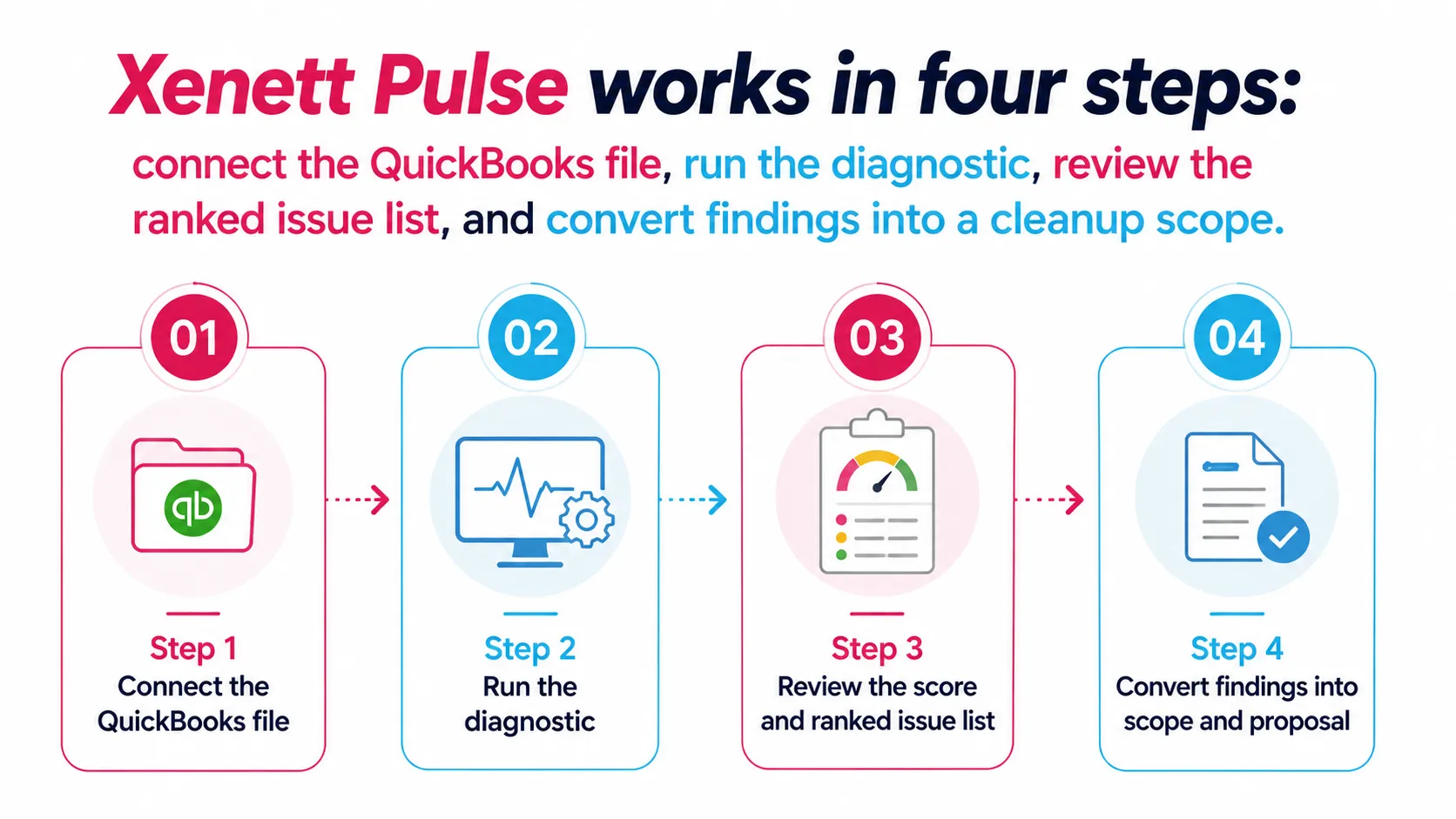
Xenett Pulse works in four steps: connect the QuickBooks file, run the diagnostic, review the ranked issue list, and convert findings into a cleanup scope. The entire process takes under two minutes.
Here is how each step works:
Step 1: Connect the QuickBooks file
Pulse connects directly to QuickBooks Online via a secure OAuth integration.
No data export.
No manual uploads.
The connection is read-only, so nothing in the client's file is changed.
Step 2: Run the diagnostic
Pulse runs all 20 checks automatically once the file is connected.
You do not configure anything.
The scan runs in the background and surfaces everything.
Step 3: Review the score and ranked issue list
You see the overall health score, 0 to 100, and a ranked list of every issue found, sorted from most urgent to lowest risk.
Each issue shows the category, the specific problem, and the severity level.
Step 4: Convert findings into scope and proposal
Pulse turns the diagnostic findings into a cleanup scope and next steps.
You walk into the proposal conversation with a precise picture of the work involved.
Not an estimate.
A documented list.
Know What's in the File Before You Quote
Xenett Pulse surfaces every reconciliation gap, duplicate, and error in under 2 minutes.
Sign Up FreeA Common Situation We See
Lakewood Accounting Group is a three-partner CPA firm that specializes in small business bookkeeping and cleanup engagements.
Before Pulse, their onboarding process looked like this: a prospect call, a quick look at the client's QuickBooks reports, and a fixed-fee proposal written in two hours.
On one engagement in Q3 2024, they quoted $3,200 for a six-month cleanup.
After starting the work, they found unreconciled transactions going back 22 months, over 400 duplicate entries, and a bank feed that had been disconnected for nine months.
The actual work took three times the quoted hours.
They absorbed the overrun.
After implementing Xenett Pulse in their pre-proposal process, they now run the diagnostic before every prospect call.
The health score becomes the basis for their pricing conversation.
Messy books get scoped accurately.
Clean books get a lighter engagement.
No surprises after the engagement letter.
Who Should Use Xenett Pulse?
Xenett Pulse is built for accounting firms and CPA practices that take on new bookkeeping clients, price cleanup engagements, or conduct pre-engagement file reviews.
If you regularly encounter one of these situations, Pulse is relevant to you:
- You onboard new bookkeeping clients and quote before fully reviewing their books
- You price catch-up or cleanup engagements on a fixed-fee basis
- You want a structured process for evaluating prospect files before a proposal call
- You conduct internal book reviews before the month-end or year-end close
- You manage multiple client files and need a fast quality check across all of them
Here is how Pulse compares to the alternatives firms currently use:
| Method | Time Required | Issues Surfaced | Proposal-Ready Output | Cost |
|---|---|---|---|---|
| Xenett Pulse | Under 2 minutes | All 20 diagnostic checks | Yes: scored, ranked report | Included with Xenett |
| Manual QBO Review | 2 to 4 hours | Depends on the reviewer | No: manual notes only | Staff time |
| QuickBooks Built-in Reports | 30 to 60 minutes | Surface-level only | No | Free |
| Spreadsheet Checklist | 1 to 3 hours | Limited by template | No | Staff time |
| Competitor Diagnostic Tools | Varies | Varies | Varies | Separate subscription |
The difference is not just speed.
It is consistency.
Every firm that uses Pulse gets the same 20-point check on every file.
No junior reviewer missing a category.
No senior accountant skipping steps because a file looks clean.
How Xenett Pulse Fits Into Your Accounting Workflow
Xenett Pulse sits at the pre-proposal stage of your accounting workflow, before scope, pricing, and engagement letters are finalized.
This is where it delivers the most value.
Once a proposal is sent and a fee is fixed, the diagnostic is interesting but not actionable.
Run it before the conversation, and it changes everything downstream.
For firms already using Xenett for their month-end close process and accounting workflow management, Pulse integrates directly into the existing client lifecycle.
The diagnostic report becomes part of the onboarding record.
The issues Pulse surfaces feed directly into the review and cleanup workflow in Xenett.
Instead of discovering problems mid-engagement, you are managing a documented list of known issues from day one.
Across 1,000+ accounting firms using Xenett, the platform has consistently delivered 70% less review time and a 3x faster close process.
Pulse extends that efficiency to the stage before the engagement even starts.
According to research on CPA firm efficiency, firms that standardize their pre-engagement process report significantly fewer scope overruns and higher client satisfaction scores.
Pulse is that process, built into a two-minute tool.
Price Every Catch-Up Engagement with Confidence
Xenett Pulse gives you a documented file assessment before the proposal conversation.
How Xenett Can Help
Xenett Pulse is the entry point into a broader workflow built for accounting firms.
Once the diagnostic is complete, Xenett's full platform supports every step that follows:
- Accounting Workflow Management: Manage cleanup projects, close workflows, and client onboarding in one place
- Month-End Close: Structured close checklists with preparer and reviewer workflows
- Auto Review: 100+ automated checks that catch errors during the ongoing review process
- Client Portal: Centralized communication with clients without switching between apps
Firms that consolidate onto Xenett replace an average of four separate tools, reducing the context-switching, license costs, and process gaps that come with a fragmented tech stack.
Pulse gets you in the door.
Xenett keeps the work running cleanly after.
The books that look clean on the surface are the ones that cost you the most. Xenett Pulse gives you the full picture before you commit.
Start free and run your first diagnostic today.
Frequently Asked Questions
What is a QuickBooks diagnostic report?
A QuickBooks diagnostic report is a structured analysis of a QuickBooks file that surfaces errors, reconciliation gaps, data quality issues, and anomalies. Unlike standard QuickBooks reports, which show financial summaries, a diagnostic report is designed to find what is wrong with the underlying data. Xenett Pulse generates a 20-point diagnostic report with a 0 to 100 health score and severity-ranked issue list.
How long does a QuickBooks file review take with Xenett Pulse?
Xenett Pulse completes a full 20-point diagnostic in under two minutes. A manual QuickBooks file review typically takes two to four hours and is limited by the reviewer's checklist and experience. Pulse runs all checks automatically, every time, with no manual configuration required.
Can I use Xenett Pulse on multiple client files?
Yes. Xenett Pulse is designed for accounting firms managing multiple client files. You can run diagnostics across your entire client portfolio and compare health scores to prioritize cleanup work or identify accounts that need attention.
Is Xenett Pulse different from QuickBooks built-in reports?
Yes, significantly. QuickBooks built-in reports show financial summaries: P&L, balance sheet, cash flow. They are not designed to surface data quality issues, reconciliation problems, or transaction anomalies. Xenett Pulse runs 20 diagnostic checks specifically designed to find what is wrong with the file, not just what the numbers say.
How do I price a bookkeeping cleanup engagement?
The most accurate way to price a cleanup engagement is to assess the actual state of the books before quoting. Common pricing factors include: number of unreconciled months, volume of duplicate or miscoded transactions, missing documentation, and the age of the oldest unresolved issue. Xenett Pulse surfaces all of these in the diagnostic report, giving you a documented basis for your pricing conversation.
What causes QuickBooks file errors?
The most common causes are: disconnected bank feeds, manual journal entries made without proper categorization, duplicate transaction imports, unapplied payments, and reconciliations that were closed without resolving all discrepancies. Many of these issues accumulate silently over months and are not visible in standard reports. Xenett Pulse is designed to detect and rank exactly these types of errors.
Does Xenett Pulse work with QuickBooks Online and Desktop?
Xenett Pulse currently integrates with QuickBooks Online. QuickBooks Desktop support is on the product roadmap. If you are managing a mix of QBO and Desktop files, contact the Xenett team for current compatibility details.
Xenett Pulse: At a Glance
| Feature | Detail |
|---|---|
| What it does | 20-point QuickBooks diagnostic: reconciliation, AR, AP, coding, anomalies |
| Who it is for | Accounting firms, CPA practices, bookkeeping teams |
| Time to run | Under 2 minutes |
| Output | 0 to 100 health score, severity-ranked issue list, cleanup scope |
| Integration | QuickBooks Online (read-only, secure OAuth) |
| Best used | Pre-proposal, client onboarding, internal file review |
| Platform | Part of Xenett's full accounting workflow suite |
Related guides
- Start here: Accounting Client Onboarding Checklist
- Bookkeeping Discovery Call Checklist — The questions to ask on a bookkeeping discovery call.
- Run a QuickBooks Diagnostic Before You Price — Why to run a QuickBooks diagnostic before you quote a price.
- QuickBooks Audit Trail for Pre-Proposal Review — Using the QuickBooks audit trail for a pre-proposal review.
Run a free Xenett Pulse diagnostic on your next client file and start the engagement with the full picture in hand.