

.avif)
Blog Summary
Most QuickBooks files look fine until someone actually checks them. Surface-level reports can show clean numbers while the underlying data has reconciliation gaps, miscoded transactions, and issues that compound month over month.
In this guide:
- What QuickBooks bookkeeping actually involves — beyond just entering transactions
- What clean QBO books look like at the account level
- The most common ways QBO bookkeeping breaks down in practice
- How to tell whether a client's books are genuinely clean or just visually tidy
- How a 20-point diagnostic gives you an evidence-based answer in under two minutes
The client says their books are up to date. The QuickBooks dashboard shows a positive cash balance. The P&L looks reasonable.
You take on the engagement.
Three weeks in, you find a bank feed that disconnected six months ago. There are $40,000 in AR entries from clients who left two years ago. The chart of accounts has 14 versions of "miscellaneous expense." And the bank reconciliation was last completed in March.
This is not an unusual story. It is, in fact, the most common way bookkeeping engagements go wrong. Not because the work is hard but because nobody checked the books before the scope was set.
QuickBooks bookkeeping is not just entering transactions. It is maintaining a file where every account reflects reality, every reconciliation is current, and every number in every report can be trusted. This guide covers what that actually looks like and how to tell whether a file meets that standard before you commit to it.
What Is QuickBooks Bookkeeping?
QuickBooks bookkeeping is the ongoing process of recording, categorizing, and reconciling financial transactions inside QuickBooks Online or QuickBooks Desktop so that the resulting financial reports accurately reflect a business's financial position.
It is not just data entry. A QuickBooks file can have thousands of transactions entered correctly and still be unreliable if those transactions are in the wrong accounts, the bank feeds are disconnected, or the reconciliations have never been completed.
Proper QuickBooks bookkeeping covers six areas:
When all six areas are maintained consistently, the file is genuinely clean. When any one of them is neglected, the reports start to diverge from reality — slowly at first, then faster as the issues compound.
Why "Looks Clean" Is Not the Same as "Is Clean"
A QuickBooks P&L can look completely normal while the underlying file has serious problems. This is the core issue with relying on surface-level reports to assess book quality.
Here is why it happens:
Standard QBO reports show totals — not data quality. The P&L adds up whatever is in the expense accounts. It does not flag that three of those accounts are duplicates of each other, or that $12,000 in transactions went to "Uncategorized Expense" because nobody knew where to code them.
Reconciliation gaps are invisible in reports. A balance sheet shows the cash balance as of the report date. It does not show that the bank feed disconnected four months ago, or that the last completed reconciliation was six months ago. The number looks right. The reliability is not.
AR and AP overstatement is common and silent. Invoices that were never collected sit in AR, inflating the asset balance. Bills that were paid without being matched to the original entry sit in AP, understating expenses. Neither shows up as an obvious error on the financial statements.
In our experience reviewing client files, most QuickBooks files that appear clean on the surface carry at least one material issue that only shows up in a transaction-level diagnostic review. That is not a rare edge case.
Who Is Responsible for Keeping QBO Books Clean?
In a CPA firm workflow, responsibility for QBO bookkeeping quality is shared — but the review responsibility sits with the accountant or firm, not the client.
The most common breakdown: the client does some of their own bookkeeping in QBO (entering invoices, recording payments) while the bookkeeper handles the rest — and nobody is reviewing whether the two layers are consistent with each other. Transactions get entered twice. Payments get applied incorrectly. Categories get mixed up.
The result is a file that technically has data in it, but that data is not reliable. And because no one did a systematic review, nobody knows exactly how unreliable it is.
When Do QuickBooks Bookkeeping Problems Start?
Most QBO bookkeeping problems do not start with a single large error. They start with small inconsistencies that nobody catches — and then compound over months.
The typical progression:
Month 1–3: Bank feed disconnects briefly. A few transactions get missed. They are backdated when someone notices, but the dates are slightly off, which creates timing differences in the reconciliation.
Month 3–6: The reconciliation gets done most months but not all. One month gets skipped during a busy period and is not caught up properly. Outstanding items carry forward.
Month 6–12: AR ages out without anyone investigating which invoices are actually collectible. Old customers with zero chance of paying still appear as assets. The chart of accounts picks up new accounts as shortcuts whenever a transaction does not fit anywhere obvious.
Month 12+: The file looks functionally normal in reports. The underlying data has reconciliation gaps, stale AR, duplicate accounts, and undeposited funds sitting untouched.
This is why assessing QBO bookkeeping quality requires looking at the file itself — not just the reports it generates.
What Does Proper QuickBooks Bookkeeping Actually Include?
A genuinely clean QBO file has specific, verifiable characteristics at the account level. Here is what each one looks like when it is done correctly:
Bank and Credit Card Accounts
- All accounts connected and feeding current transactions
- Reconciled through the most recent statement period
- No accounts with "never reconciled" status
- No reconciliation gaps older than 30 days
Chart of Accounts
- No duplicate accounts (two versions of "Office Supplies," three versions of "Marketing")
- No catch-all accounts with high transaction volumes ("Miscellaneous," "Ask My Accountant")
- Income and expense accounts structured to match the business's actual operations
- No personal transactions mixed into business accounts
Accounts Receivable
- All open invoices are current and actively being collected
- No invoices more than 90 days old without an explanation
- Payments applied to the correct invoices — not sitting unapplied
- No negative customer balances without investigation
Accounts Payable
- All open bills represent current, unpaid obligations
- No bills more than 60 days old without an explanation
- Payments matched to original bills — no floating credits
- 1099 vendor tracking current throughout the year
Undeposited Funds
- Account balance is either zero or contains only current-period deposits
- No amounts sitting in undeposited funds from prior periods
- Customer payments correctly flowing through to bank deposits
Transaction Coding
- No transactions in "Uncategorized Income" or "Uncategorized Expense"
- No transactions coded to the wrong account type (expense to asset, etc.)
- Consistent coding across the same vendors and transaction types
The 7 Signs QuickBooks Books Are Messier Than They Look
These are the signals that indicate surface tidiness without actual data integrity:
1. The P&L looks clean but the balance sheet has old open items A balance sheet with AR over 90 days, AP over 60 days, or loans that don't reconcile to current statements is a file with aging problems that the P&L doesn't show.
2. Bank reconciliation was done but shows unexplained differences A reconciliation that shows a $847 unexplained variance — marked as complete — is not actually reconciled. Someone closed it out with the difference sitting unresolved.
3. The chart of accounts has grown every time someone didn't know how to code something A chart of accounts with 200+ accounts for a small business, including multiple versions of similar accounts, is a file where coding shortcuts replaced proper bookkeeping.
4. Undeposited funds has a non-zero balance from prior periods Any amount in undeposited funds from more than 30 days ago is either a missed bank deposit or an accounting error. Either way, it is inflating assets.
5. "Ask My Accountant" has a significant balance This account is a parking spot for transactions nobody knew how to code. A large balance means a lot of unresolved transactions are sitting without proper classification.
6. AR has customers with balances that have not moved in over a year Old AR that has never been written off or investigated is overstating assets. It is money the business will probably never collect, still showing as receivable.
7. The file has never had a full diagnostic review Most QBO files carry at least one material issue. If no systematic review has ever been run on this file, the probability that it has issues is simply high.
Common QuickBooks Bookkeeping Failures — And What They Cost
How to Assess a QBO File Before You Quote or Onboard
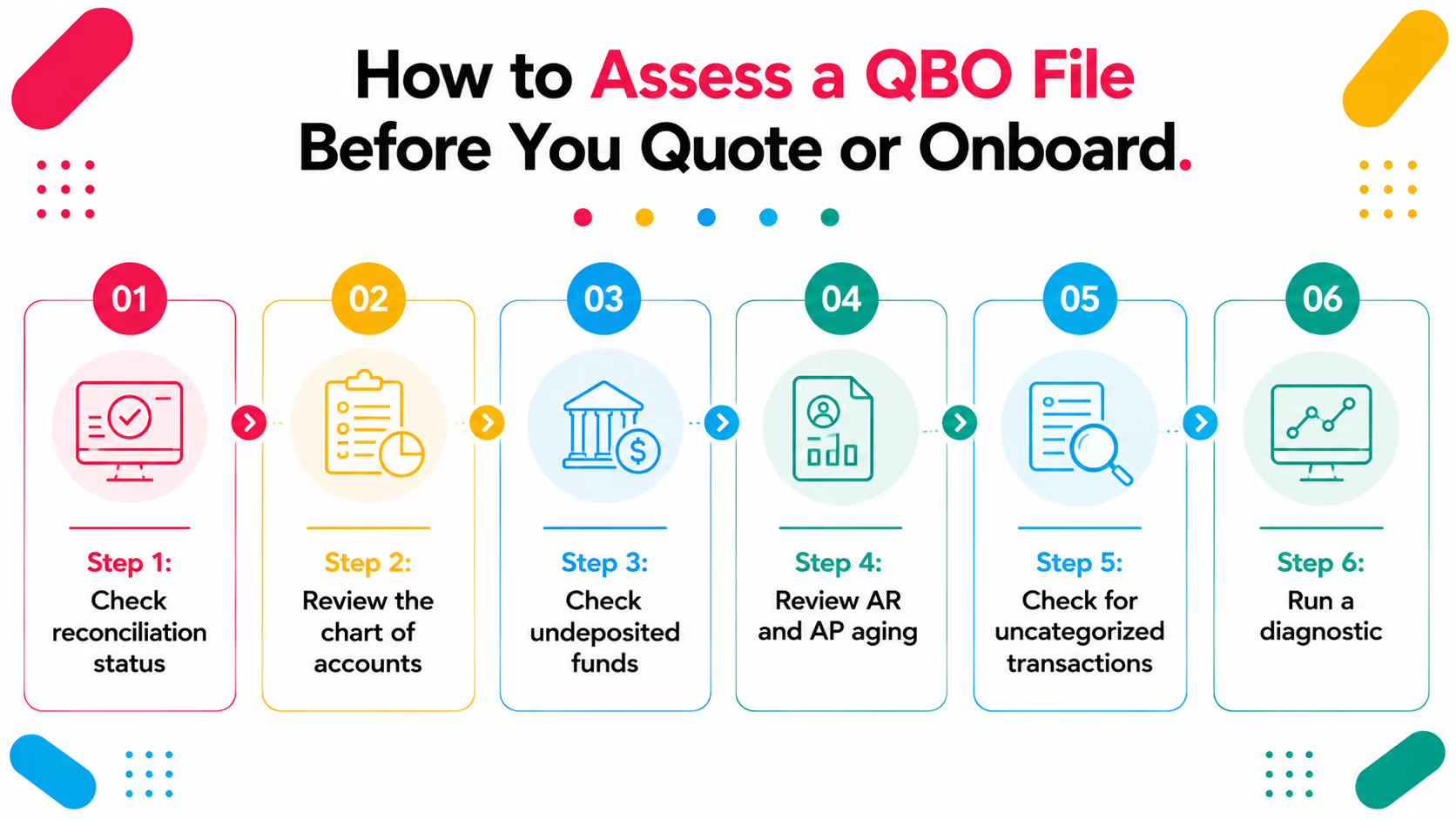
Before scoping any QuickBooks bookkeeping engagement — new client onboarding, cleanup, or ongoing service — the file needs to be assessed at the account level, not just the report level.
Step 1: Check reconciliation statusLook at every bank and credit card account. When was it last reconciled? Is it current through the most recent statement? Are there any accounts that have never been reconciled?
Step 2: Review the chart of accountsLook for duplicate accounts, catch-all accounts with high balances, and accounts that don't map to the business's actual operations.
Step 3: Check undeposited fundsIs there a balance? How old are the items in it? Anything older than 30 days needs investigation.
Step 4: Review AR and AP agingHow much AR is over 90 days? How much AP is over 60 days? Are there negative balances on either side?
Step 5: Check for uncategorized transactionsSearch for "Uncategorized Income," "Uncategorized Expense," and "Ask My Accountant." Any significant balances in these accounts mean unresolved coding work.
Step 6: Run a diagnosticA systematic 20-point diagnostic review surfaces everything that a manual check might miss — ranked by severity so you know what is urgent vs. what can wait.
A Scenario We See Often: The AR Balance That Was Never Going to Be Collected
A CPA firm onboards a restaurant group as a new bookkeeping client. The client's QBO file showed $40,000 in accounts receivable. The books were current. The reconciliations were done. Everything looked fine.
Three months into the engagement, during a quarterly review, the senior accountant pulled the AR aging detail. Of the $40,000:
- $28,000 was from three corporate clients who had closed their accounts two years earlier
- $9,000 was from invoices sent to the wrong email address and never received by the customer
- $3,000 was legitimate current AR
The firm had been reporting the full $40,000 as a current asset. The client had been making business decisions partly based on that asset position. The corrected balance sheet looked materially different.
How it should have been caught: A pre-onboarding diagnostic review of the AR aging would have flagged $37,000 in AR older than 90 days immediately. That finding would have changed the scope conversation, the pricing, and the initial cleanup plan — before any work started.
The firm now runs a Xenett Pulse diagnostic on every new client file before the engagement letter goes out. The diagnostic surfaces AR issues, reconciliation gaps, and coding problems in under two minutes — before scope is locked and margin is committed.
How Xenett Pulse Tells You What's Actually in the Books
Xenett Pulse connects to a QuickBooks file QBO or QB Desktop and runs a 20-point diagnostic automatically. The output is a Books Health Score from 0–100 and a ranked list of issues by severity.
What Pulse checks in a QBO file:
The report is client-ready, white-labelled with your firm's branding, and generated in under two minutes.
The outcome:
- You know what is actually in the file before you quote
- Your scope is based on evidence, not what the client told you
- Your fee reflects the real work not what the surface looked like
- Scope creep drops because nothing is hidden at the start
Firms routinely find meaningful scope expansion when they run Pulse on files they assumed were clean. That scope expansion was always there. Pulse surfaces it before the engagement letter goes out.
Sign up free — no credit card, no commitment. Run a diagnostic on your next prospect file and see what's actually in the books.
Conclusion
QuickBooks bookkeeping is not a binary. It is not clean or messy. It is a spectrum from files with minor timing issues that resolve easily, to files with years of compounding errors that take weeks to unwind.
The problem is that most QBO files look the same on the surface. The P&L runs. The balance sheet balances. Cash shows a positive number. The reports appear to work.
What they do not show is whether the bank feeds are current, whether the reconciliations are real, whether the AR is actually collectible, or whether the transactions are in the right accounts.
The only way to know is to look at the file itself — not the reports it generates.
For CPA firms, that means building a pre-onboarding diagnostic review into every new client process. Not because most files are disasters. Because most carry at least one material issue that changes the scope, the pricing, or the cleanup plan.
Finding that issue before the engagement starts is the difference between a profitable engagement and one that absorbs hours you never quoted for.
Frequently Asked Questions
What is QuickBooks bookkeeping?
QuickBooks bookkeeping is the ongoing process of recording, categorizing, and reconciling financial transactions inside QuickBooks Online or QuickBooks Desktop. It includes bank feed management, reconciliation, AR and AP maintenance, and chart of accounts upkeep — not just transaction entry.
How do I know if my QuickBooks books are clean?
Surface-level reports are not a reliable indicator. Clean books have all bank and credit card accounts reconciled through the current period, no uncategorized transactions, current AR and AP with no stale items, and a chart of accounts without duplicates or catch-all accounts. A 20-point diagnostic review using a tool like Xenett Pulse gives you a definitive, evidence-based answer in under two minutes.
What are the most common QuickBooks bookkeeping problems?
The most common issues are disconnected bank feeds, unreconciled accounts, miscoded or uncategorized transactions, stale AR (invoices more than 90 days old that will never be collected), undeposited funds with old items, and duplicate chart of accounts entries. Most of these are invisible on standard QBO reports.
How long does QuickBooks bookkeeping take?
It depends entirely on transaction volume, number of accounts, and how current the file is. A simple small business with 100–200 monthly transactions and clean books takes 2–4 hours per month. A file with a backlog, reconciliation gaps, or complex operations can take significantly more — which is why assessing the file before quoting matters.
What is the difference between QuickBooks bookkeeping and accounting?
QuickBooks bookkeeping is the transaction-level work — recording, categorizing, and reconciling. Accounting is the interpretation of that data — financial statement preparation, tax filing, advisory. Bookkeeping produces the data. Accounting explains what it means. Both depend on the underlying QBO file being accurate and current.
Why do QuickBooks books often look clean but contain errors?
Because standard QBO reports show totals — not data quality. A P&L adds up whatever is in the expense accounts without flagging whether those accounts are correct. A balance sheet shows a cash balance without indicating whether the bank feed is current. The reports are only as reliable as the underlying data — and most firms have no systematic way to assess that reliability without a transaction-level review.
How do CPA firms check QuickBooks book quality before onboarding?
The most reliable approach is a systematic pre-onboarding diagnostic — checking reconciliation status on every account, reviewing AR and AP aging, checking undeposited funds, scanning for uncategorized transactions, and assessing chart of accounts quality. Xenett Pulse automates this 20-point diagnostic in under two minutes for any QuickBooks file, producing a Books Health Score and ranked list of issues before any scope or fee is committed.
The complete QuickBooks bookkeeping series
Every guide below goes deeper on one part of the process covered above.
- QuickBooks Chart of Accounts - How to structure the chart of accounts so coding stays clean.
- QuickBooks General Ledger Review - How to review the general ledger and what errors to look for.
- Undeposited Funds in QuickBooks - Why undeposited funds builds up and how to clear it correctly.
- QuickBooks Accounts Receivable - How AR overstates assets and how to fix each cause.