

Blog Summary
- Client books fail review because standard reports show numbers, not what is wrong underneath.
- The five failure points: reconciliation gaps, duplicate transactions, disconnected feeds, uncleared AR, and miscoded expenses.
- 68% of engagements start with unvalidated books, with an average scope expansion of 3x after discovery.
- A pre-engagement diagnostic surfaces all five failure points before the proposal goes out.
- Xenett Pulse runs the full check in under two minutes and produces a client-ready report.
A new client sends you access to their QuickBooks file.
You run a balance sheet.
It balances.
You run a P&L.
It looks normal.
You write the proposal.
Three weeks into the engagement, you realize the books have not passed a proper review in over a year.
Duplicate transactions across three accounts.
AR that has not been cleared in eight months.
Expenses coded so inconsistently that the P&L is unreliable for any period comparison.
The books looked fine in summary.
They failed a proper review the moment anyone looked underneath.
This is the gap between what standard QuickBooks reports show and what a proper bookkeeping review actually surfaces.
This guide covers the five most common ways client books fail review, why each one stays hidden, and what to check before you quote any bookkeeping cleanup service.
Part of our complete guide: accounting client onboarding guide
Why Standard Reports Do Not Surface Cleanup Problems
Standard QuickBooks reports show what the numbers say. They do not show what is wrong with the data underneath those numbers.
A balance sheet shows assets, liabilities, and equity.
It does not show whether any of those accounts have been reconciled recently.
A P&L shows income and expenses.
It does not show whether the expense categories are consistent or whether half the transactions are miscoded.
An AR aging report shows outstanding invoices.
It does not flag which of those invoices have unapplied payments sitting next to them that should have cleared them months ago.
The surface of a QuickBooks file can look completely clean while hiding months of compounding problems underneath.
According to data from Xenett Pulse, 68% of engagements start with unvalidated books.
The average scope expansion after discovery is 3x.
That scope expansion comes directly from cleanup problems that were already in the file before anyone looked for them.
Stop Absorbing Catch-Up Overruns
Run a 20-point Xenett Pulse diagnostic in under 2 minutes and quote from evidence, not estimation.
Sign Up FreeThe Five Ways Client Books Fail Review
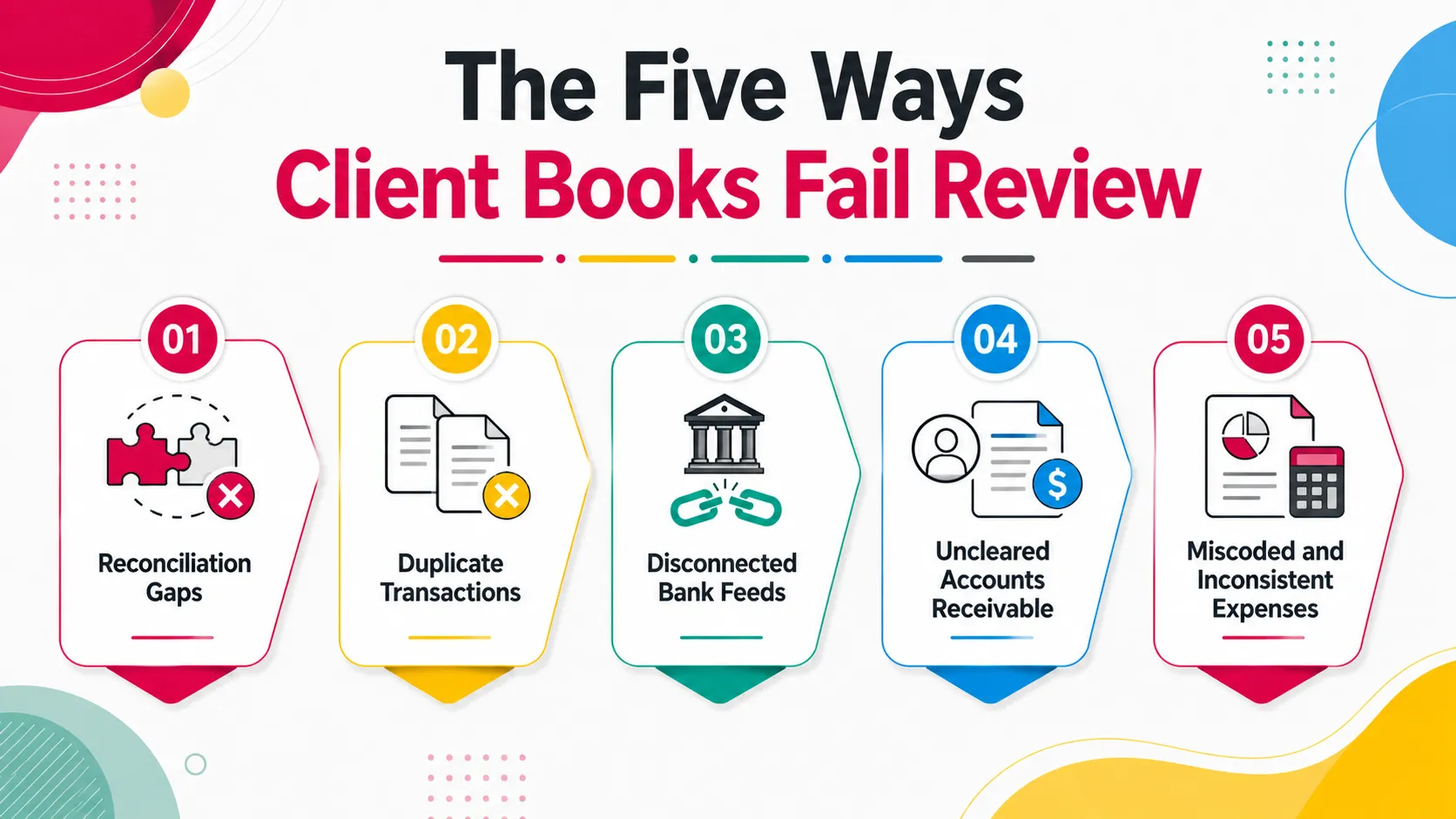
1. Reconciliation Gaps
Unreconciled accounts are the most common and most expensive cleanup problem. Each unreconciled month adds a layer of unverified transactions on top of the last.
A client's books can show a reasonable bank balance while the underlying account has not been reconciled in nine months.
The balance shown is the last imported bank feed transaction.
It is not a verified balance.
It has not been confirmed against a bank statement.
Any duplicates, missing transactions, or errors in that nine-month period are undetected.
When reconciliation catch-up work is added to a scope that did not account for it, the engagement fee is immediately underwater.
Pulse checks every account's reconciliation status and returns three possible findings: reconciled through period end, stale over six months, or never reconciled.
Each status has a direct impact on cleanup scope and pricing.
2. Duplicate Transactions
Duplicate transactions inflate balances and distort every report built on them. They are completely invisible in summary reports.
They enter the file in two ways.
A bank feed reconnects after a disconnection and re-imports transactions that were already entered manually.
Or a client imports a CSV of transactions that the feed also imported.
The result is the same transaction recorded twice, in two different entries, with no flag or warning.
The balance sheet shows an inflated expense.
The P&L shows inflated COGS or operating costs.
The cash balance is off by the total of all duplicates.
None of this shows up as an error message anywhere in QuickBooks.
It only surfaces when someone checks for duplicate entries directly.
3. Disconnected Bank Feeds
A disconnected bank feed stops importing transactions silently. The QuickBooks balance simply stops updating, with no alert in any report.
The bank updates its authentication requirements.
The feed connection expires.
Transactions stop pulling.
Nobody notices because QBO still shows a balance.
It just stops being accurate.
For a high-volume account, three months of disconnected feed means hundreds of missing transactions.
When reconciliation runs, the transaction set is incomplete.
The reconciliation cannot close because the bank statement has transactions that are not in QBO.
Every missing transaction requires manual entry or re-import.
4. Uncleared Accounts Receivable
Uncleared AR accumulates when payments arrive but are never matched to open invoices. The AR balance grows artificially and the books show money owed that has already been paid.
A payment is received and recorded as income.
The open invoice is never cleared.
Both the payment and the invoice stay in the file, unconnected.
This happens once.
Then again.
After a year, the AR aging report shows dozens of open invoices that were actually paid months ago.
The business looks like it is owed money it has already collected.
Any cash flow analysis built on that AR balance is wrong.
5. Miscoded and Inconsistent Expenses
Miscoded expenses assign transactions to the wrong account. Inconsistent coding means the same transaction type is recorded differently across different periods, making month-over-month comparison unreliable.
QuickBooks suggests a category based on payee name.
The suggestion is accepted without verification.
A software subscription gets coded as office equipment.
A personal purchase gets coded as a business meal.
Over time, expense categories become unreliable.
The P&L shows numbers but they do not reflect what actually happened.
Tax preparation requires a full recode pass before the data can be used.
Any management decision based on the P&L is built on inaccurate category data.
Know What's in the File Before You Quote
Xenett Pulse surfaces every reconciliation gap, duplicate, and error in under 2 minutes.
Sign Up Free
What a Proper Pre-Engagement Review Checks
A proper pre-engagement review checks all five failure points directly, not through summary reports, but through account-level and transaction-level data.
Here is what that means in practice:
| What to Check | Why Summary Reports Miss It | Where to Look |
|---|---|---|
| Reconciliation status | Balance sheet shows balance, not reconciliation history | Reconciliation history for each account |
| Duplicate transactions | P&L shows totals, not individual transaction pairs | Transaction list sorted by date and amount |
| Bank feed status | No report flags a disconnected feed | Banking tab: feed connection status per account |
| Unapplied AR payments | AR aging shows open invoices, not payment match status | Customer transaction detail |
| Coding consistency | P&L shows categories, not coding patterns across periods | Transaction list by account across multiple periods |
Doing this manually across a multi-account client file takes two to four hours.
For a firm reviewing ten new prospects a month, that is 20 to 40 hours of pre-engagement review time before a single proposal is sent.
Xenett Pulse automates the entire check.
Connect the client's QuickBooks file and Pulse runs a 20-point diagnostic in 1 minute 42 seconds.
All five failure points are checked simultaneously.
The output is a Books Health Score (0 to 100) and a ranked issue list showing exactly what failed, how severe each issue is, and what it means for the scope.
How to Use the Review Findings Before You Quote
Use the diagnostic findings to build a two-phase proposal: a cleanup phase priced from the findings, and an ongoing phase priced on clean books.
The standard mistake is writing a monthly bookkeeping proposal before running the review.
The monthly fee gets set.
The engagement starts.
The cleanup problems surface.
The monthly fee does not cover them.
The right sequence:
- Run the diagnostic
- Review the Books Health Score and ranked findings
- Estimate cleanup hours based on what the diagnostic surfaces
- Quote Phase 1 (cleanup) as a one-time fee
- Quote Phase 2 (ongoing bookkeeping) as a monthly fee starting after Phase 1 is complete
The proposal reflects the actual work.
The client understands what they are paying for and why.
The margin on Phase 2 is protected because Phase 1 cleaned the books first.
A Common Situation We See
A bookkeeping firm takes on a new e-commerce client.
The balance sheet looks reasonable.
The P&L shows consistent revenue.
They quote $1,200/month for ongoing bookkeeping.
Work starts.
The first reconciliation attempt fails.
Tracing the discrepancy reveals a disconnected Shopify feed from five months ago, 280 duplicate transactions from a CSV import, and AR that has not been cleared in seven months.
The firm spends 44 hours resolving the five failure points before the first monthly deliverable goes out.
After adding Xenett Pulse to their pre-proposal process, the same firm now runs the diagnostic on every new prospect file before the proposal call.
The diagnostic surfaces all five failure points in under two minutes.
Phase 1 cleanup is quoted separately.
The monthly fee starts only after the books are clean.
Scope overruns on new engagements dropped to near zero.
How Xenett Pulse Can Help
Xenett Pulse checks all five failure points automatically as part of a 20-point diagnostic.
The diagnostic covers:
- Reconciliation status for every account (current, stale, never reconciled)
- Duplicate transactions across banking, AR, and AP
- Bank feed connectivity and gap detection
- AR issues: unapplied payments and stale open invoices
- Transaction coding: miscoded expenses, missing classifications, and GPT-powered anomaly detection
The full diagnostic runs in 1 minute 42 seconds.
The output is a Books Health Score from 0 to 100, with findings ranked by severity: urgent, compounding, or safe to monitor.
The report is white-labelled and client-ready as a PDF from day one.
You can share it with the prospect as the basis for the Phase 1 scope conversation.
68% of engagements start with unvalidated books. Pulse is what puts your firm in the other 32%.
Sign up free and run your first diagnostic before your next proposal.
Frequently Asked Questions
Why do client books fail a proper review?
Because standard QuickBooks reports show balances and summaries, not the underlying data quality issues like reconciliation gaps, duplicate transactions, and disconnected feeds. These problems accumulate silently and are only visible when someone checks account-level and transaction-level data directly.
What should I check before quoting a bookkeeping cleanup service?
Check five things: reconciliation status for every account, duplicate transactions, bank feed connectivity, unapplied AR payments, and transaction coding consistency. Xenett Pulse automates all five checks in under two minutes.
How do I know if a client's books need cleanup before I start?
Run a pre-engagement diagnostic. A Books Health Score below 70 on the Pulse diagnostic typically indicates significant cleanup work is needed before ongoing bookkeeping can begin.
What is the average cost of a bookkeeping cleanup engagement?
It varies significantly based on file condition, backlog length, and transaction volume. The most accurate way to price a cleanup engagement is to run a pre-engagement diagnostic and use the findings to estimate hours before writing the proposal.
How long does a pre-engagement bookkeeping review take?
Manual review takes two to four hours per file. Xenett Pulse runs the full 20-point diagnostic in 1 minute 42 seconds.
What does a Books Health Score mean?
A Books Health Score is a 0 to 100 rating of a QuickBooks file's health across reconciliation, data quality, and accuracy. A score of 0 to 40 indicates significant cleanup work. 40 to 70 indicates moderate issues. 70 to 100 indicates a relatively clean file.
Can I show the diagnostic report to the client?
Yes. Xenett Pulse generates white-labelled, client-ready PDFs from day one. The report can be shared directly with the prospect as the basis for the cleanup scope conversation.
Price Every Catch-Up Engagement with Confidence
Xenett Pulse gives you a documented file assessment before the proposal conversation.
Conclusion
Client books that look clean in summary are not necessarily clean underneath.
The five failure points in this guide are all invisible to standard QuickBooks reports.
They are all visible to a diagnostic that checks account-level and transaction-level data directly.
Run the diagnostic before every proposal.
Use the findings to build a scope that reflects the actual work.
Quote from evidence, not from what the balance sheet shows.
Related guides
- Start here: Accounting Client Onboarding Checklist
- Turn a Diagnostic Into a Signed Engagement — Turning diagnostic findings into a signed engagement letter.
- What Is Xenett Pulse? — How an automated QuickBooks diagnostic tool fits the workflow.
- Bookkeeping Discovery Call Checklist — The questions to ask on a bookkeeping discovery call.
Run a free Xenett Pulse diagnostic on your next prospect file and see exactly what is in the books before the engagement begins.